Erste Schritte Zuletzt aktualisiert: 06.02.2024

DEPRAG Smart ist die digitale Lösung mit zahlreichen Werkzeugen (MQTT, REST, Excel Unterstützung, …) für Ihre Herausforderungen bei der SPS Programmierung. Mit DEPRAG Smart haben Sie ein Werkzeug zur Hand, das weit über eine einfache Bibliothek hinausgeht. DEPRAG Smart liefert die Basis zur Verwirklichung von Industrie 4.0 relevanten Inhalten und bietet zahlreiche Möglichkeiten entsprechend dem industriellen Standard. DEPRAG Smart kann mit unterschiedlichen SPSen (Beckhoff, Siemens) verwendet werden und ist in wenigen Minuten in Ihr SPS Projekt eingebunden und kann direkt verwendet werden.

Systemanforderungen

Die Softwarelösung besteht aus zwei Komponenten: eine OPC UA Server Komponente die auf einem IPC installiert wird und native Clientbibliotheken für Ihre SPS Umgebung. Die Clientbibliotheken bieten dabei eine einfache und schnelle Möglichkeit Daten mit dem OPC UA Server auszutauschen und Funktionen auszuführen.

DEPRAG Smart
Betriebssystem: Windows 10 oder neuer bzw. dementsprechende Serverversion, 64 Bit - alternativ Raspberry Pi 4 oder neuer oder vergleichbare Geräte mit Linux ARM Prozessor
CPU: 2 Kerne mit mindestens 1,5GHz
Festplattenspeicher: mind. 1GB

Die Clientbibliotheken werden für folgende SPS Anbieter bereitgestellt. Andere, nicht aufgeführte SPS Anbieter können - sofern Sie einen OPC UA Client anbieten - durch einfaches Aufrufen des OPC UA Servers verbunden werden.

Beckhoff TwinCAT 3 Siemens TIA Portal
OPC UA fähige Steuerung
Installation des Beckhoff TwinCAT OPC UA Pakets (TF6100)
OPC UA fähige Steuerung
TIA Portal V17
OPC UA Runtime-Lizenz
Aktuelle Firmware-Version der CPU der Steuerung

Installation

Im Nachfolgenden wird erläutert, wie Sie den DEPRAG Smart OPC UA Server auf einem Windows System installieren können. Für die Installation auf einem Raspberry PI 4 führen Sie die Schritte aus der mitgelieferten Readme.txt durch.
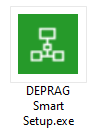
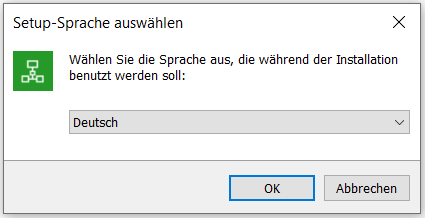
Durch Klick auf nachfolgend dargestelltes Icon wird ein Setup gestartet, welcher Sie durch die einzelnen Schritte der Installation führt:
logo
Wählen Sie die Sprache aus, die für den Setup verwendet werden soll.
logo
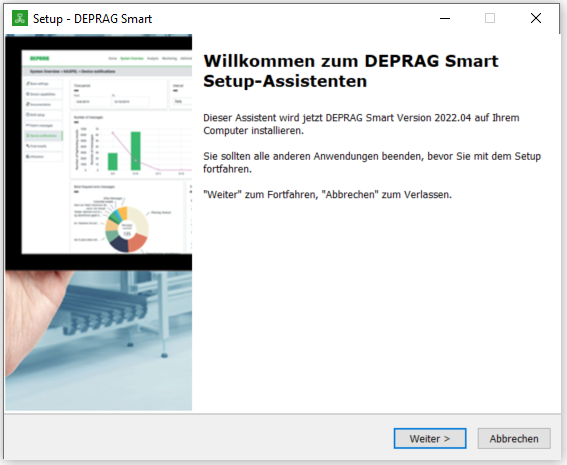
Es wird eine Begrüßungsseite mit weiteren Hinweisen zur Installation angezeigt.
logo
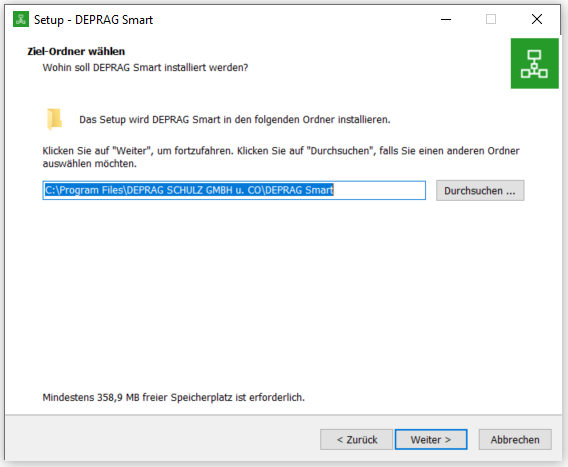
Wählen Sie den Ziel-Ordner aus, in den DEPRAG Smart installiert wird.
logo

Hier kann ausgewählt werden, wie DEPRAG Smart nach der Installation verwendet werden soll:
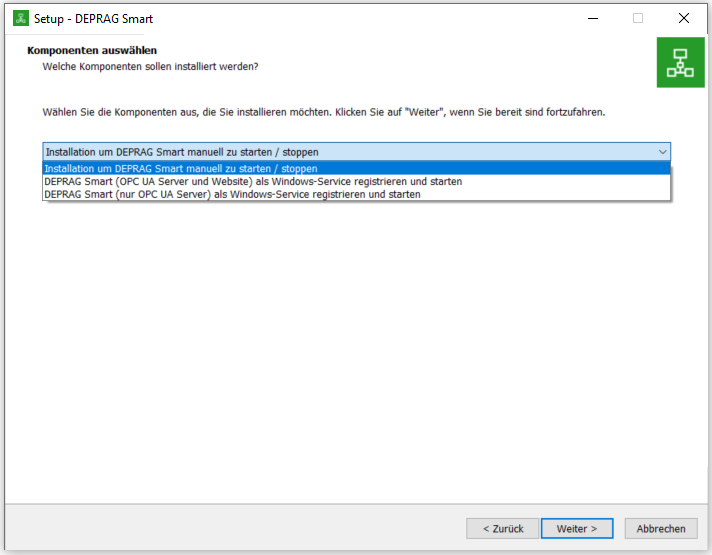
Option 1: Installation um DEPRAG Smart manuell zu starten und zu stoppen.
Option 2: Der DEPRAG Smart OPC UA Server sowie die DEPRAG Smart Website werden als Windows-Service registriert und gestartet.
Option 3: Ausschließlich der DEPRAG Smart OPC UA Server wird als Windows-Service registriert und gestartet.
logo
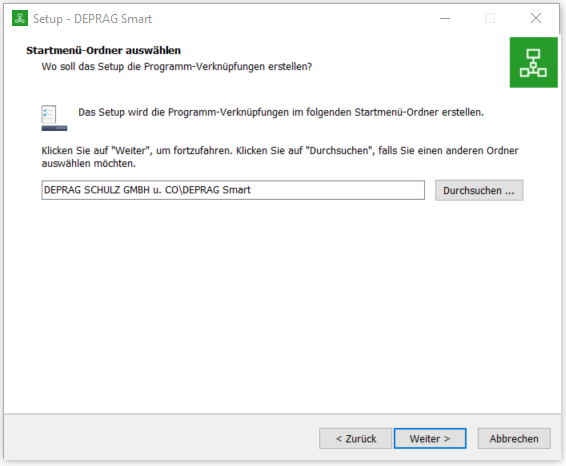
Wählen Sie das Startmenü-Verzeichnis aus.
logo
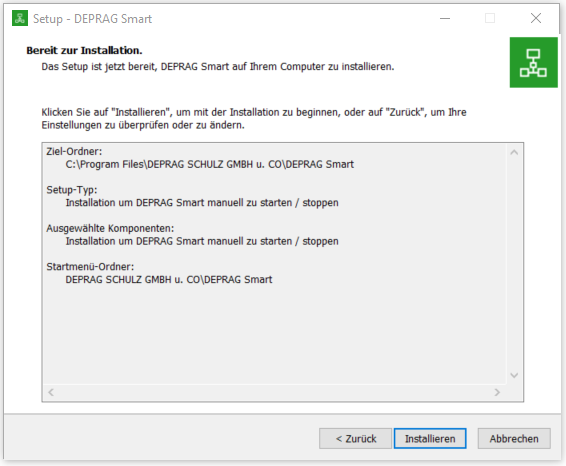
Auf dieser Seite wird eine Zusammenfassung der während des Setups vorgenommenen Einstellungen angezeigt.
logo
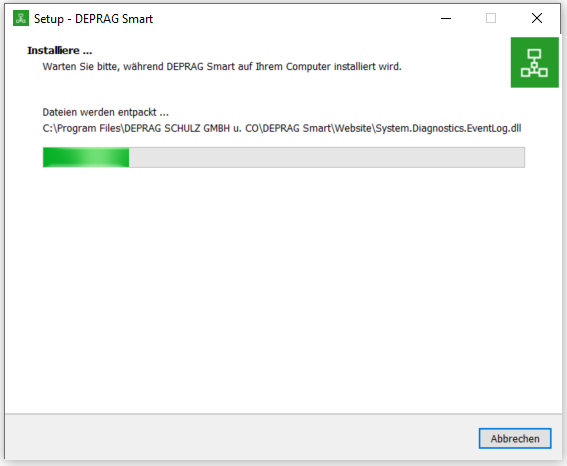
Hier wird der aktuelle Status der laufenden Installation angezeigt.
logo
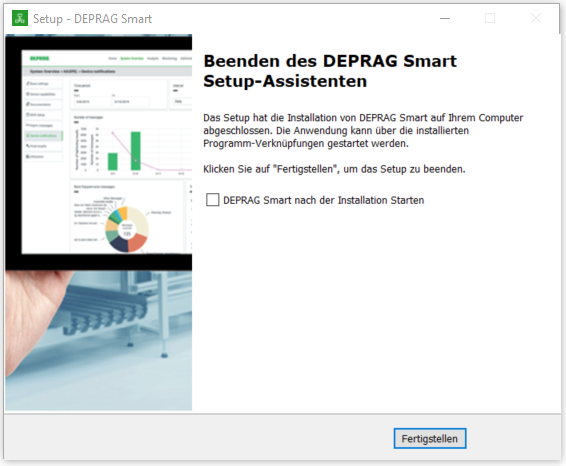
Auf dieser Seite werden abschließende Hinweise zur Installation angezeigt. Bei Auswahl der Option "Installation um DEPRAG Smart manuell zu starten / stoppen" kann DEPRAG Smart nach Schließen des Setups automatisch gestartet werden.
logo

OPC UA

Im Folgenden wird die Struktur der Rückgabewerte beschrieben. Diese besitzen immer die gleichbleibende, nachfolgende Struktur.

Struktur der Rückgabewerte

    IsOk
    Gibt an, ob die Ausführung der Methode in Ordnung war.

Beckhoff TwinCAT 3

Im Nachfolgenden wird erläutert, wie Sie DEPRAG Smart in Ihr TwinCAT 3 Projekt einbinden und verwenden können.

Download der DEPRAG Smart Bibliothek und TwinCAT 3 Beispiel-Projekt

Auf der DEPRAG Smart Website können in der linken Navigation unter dem Punkt "Service" im Untermenü "SPS-Integration" nachfolgende Inhalte zur Verwendung mit TwinCAT 3 heruntergeladen werden:
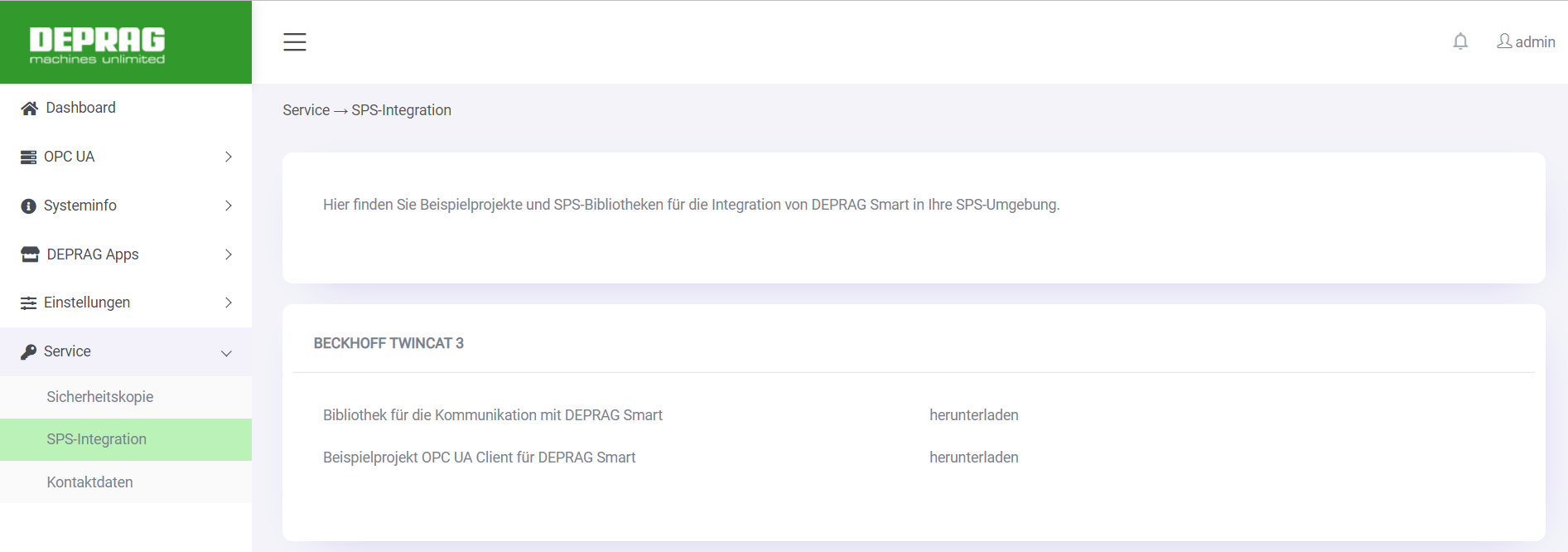
Eine Bibliothek, welche nach Einbindung in Ihr TwinCAT 3 Projekt ermöglicht, die Funkionalitäten des DEPRAG Smart OPC UA Servers aufzurufen.
Ein Beispielprojekt, welches zeigt, wie auf den DEPRAG Smart OPC UA Server mit Hilfe der DEPRAG Smart TwinCAT 3 Bibliothek zugegriffen werden kann. Die heruntergeladene zip-Datei enthält zudem die DEPRAG Smart TwinCAT 3 Bibliothek.
logo

Returncodes/Fehlercodes in TwinCAT 3

Jede Methode im TwinCAT 3 Beispiel liefert einen Rückgabewert vom Typ HRESULT zurück. Dieser kann entweder die vordefinierten SUCCESS-Codes oder ERROR-Codes für HRESULT (Zur Beschreibung auf der Beckhoff-Webseite) oder die ERROR-Codes des OPC UA Clients (Zur Beschreibung auf der Beckhoff-Webseite) enthalten.

Vor dem ersten Ausführen und während des Ausführens liefern die Rückgabewerte der Methoden „S_FALSE“ zurück. Bei erfolgreicher Ausführung liefern die Methoden „S_OK“ zurück. Bei fehlerhaften Ausführung liefern die Methoden einen der vorherbeschriebenen ERROR-Codes zurück.

Rückgabewerte vom Typ "STRING"

Grundsätzlich können string-Variablen innerhalb von Methodenrückgaben maximal eine Länge von 80 Zeichen annehmen, auch wenn diese im entsprechenden Rückgabe-Typen mit einer Länge von 255 Zeichen definiert sind.

Siemens TIA Portal

Für die Verwendung ist ein Siemens TIA Portal in der Version V17 oder neuer erforderlich. Es muss eine entsprechende OPC UA Runtimelizenz von Siemens erworben und hinterlegt werden.

Starten Sie DEPRAG Smart und setzen Ihr Siemens TIA Projekt auf. Im Tia Portal können Sie die Online Verbindung zum DEPRAG SMART Server herstellen und die Funktionen verwenden.

Für eine detaillierte Beschreibung der einzelnen Inbetriebnahmeschritte mittels des Siemens TIA Portals sehen Sie bitte in die Unterlagen des SPS Anbieters nach.

Im Nachfolgenden werden Beispiele und Erklärungen bezüglich der Aufrufe von Knoten via Siemens TIA Portal dargestellt.

Inbetriebnahme und OPC UA Client Konfiguration:

Die Inbetriebnahme und die OPC UA Client Konfiguration befindet sich in der S7-Anwenderbaustein Beschreibung des OPC UA Client. "Siemens OPC UA Anwenderbaustein"


Listen und Methodenaufrufe ohne Umschaltung

Die nachfolgenden Schritte beschreiben das Vorgehen der Listen und Methodenaufrufe ohne Umschaltung
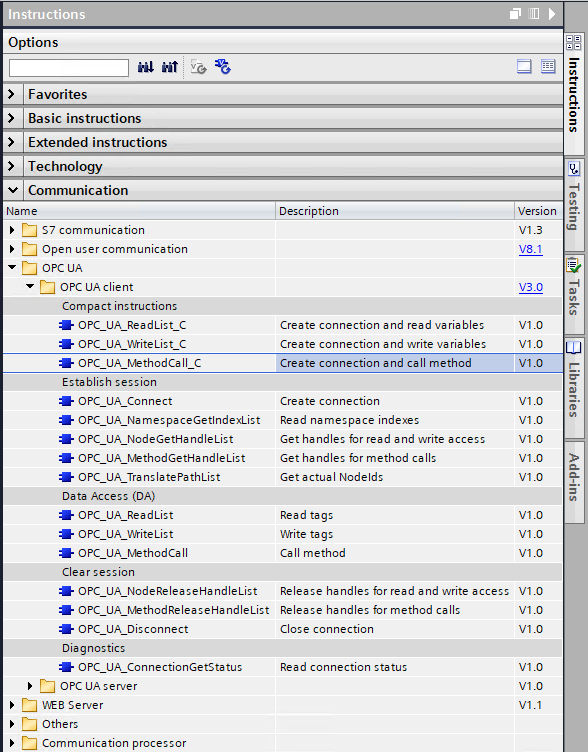
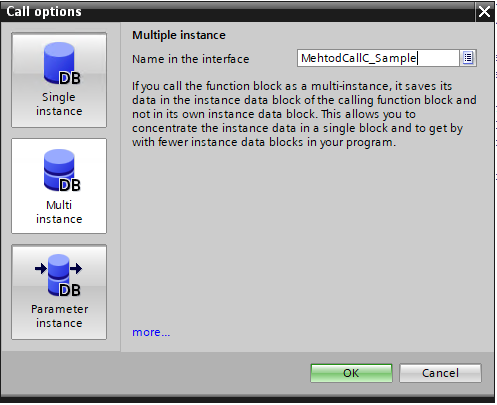
Die Funktionen OPC_UA_ReadList_C, OPC_UA_WriteList_C und OPC_UA_MethodCall_C können per Drag & Drop, oder durch einen Doppelklick auf den jeweiligen Funktionsbaustein dem bestehenden Programm hinzugefügt werden.
logo
Wählen Sie nun die Art sowie den Namen der Instanz für den verwendeten Funktionsbaustein aus.
logo
Klicken Sie auf den Instanznamen, um die Konfiguration zu öffnen.
logo
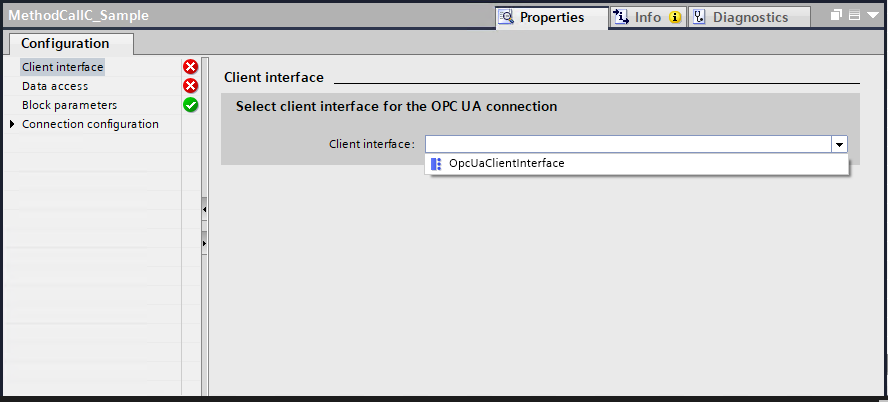
Wählen Sie das jeweilige OPC UA Client Interface aus.
logo
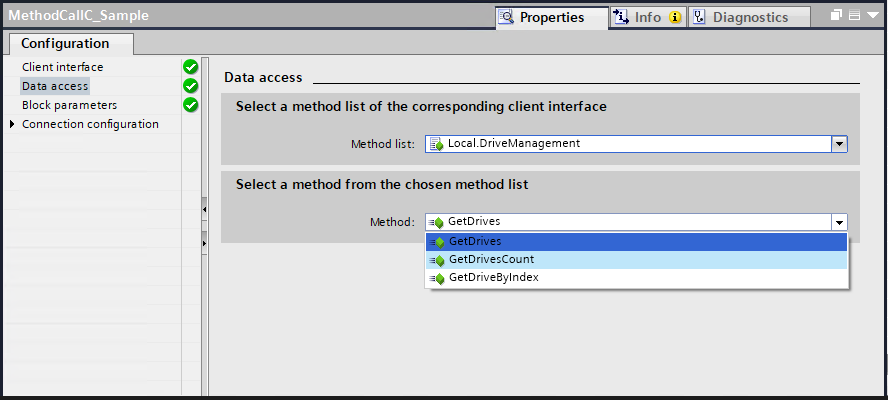
Wählen Sie die Methodenliste mit der auszuführenden Methode aus.
logo
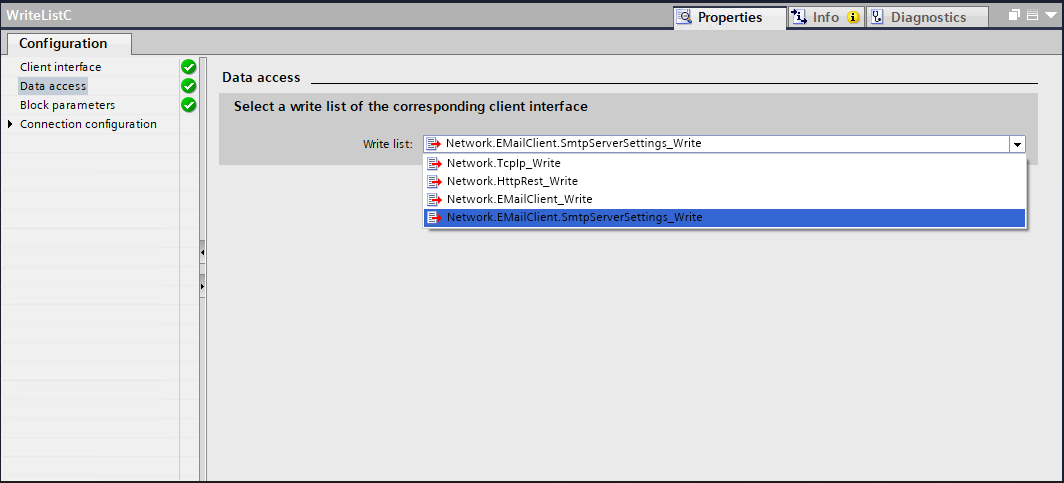
Wählen Sie die benötigte Schreibliste aus.
logo
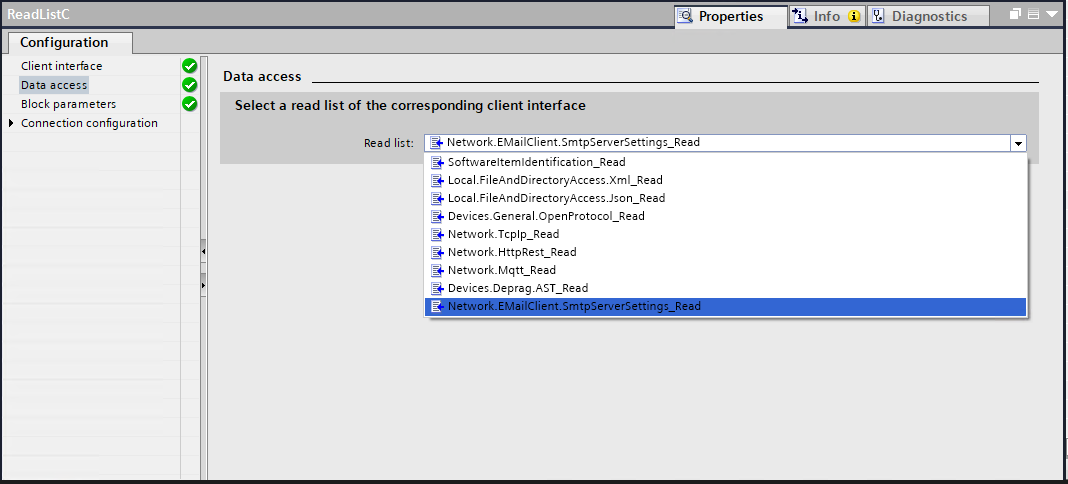
Wählen Sie die benötigte Leseliste aus.
logo
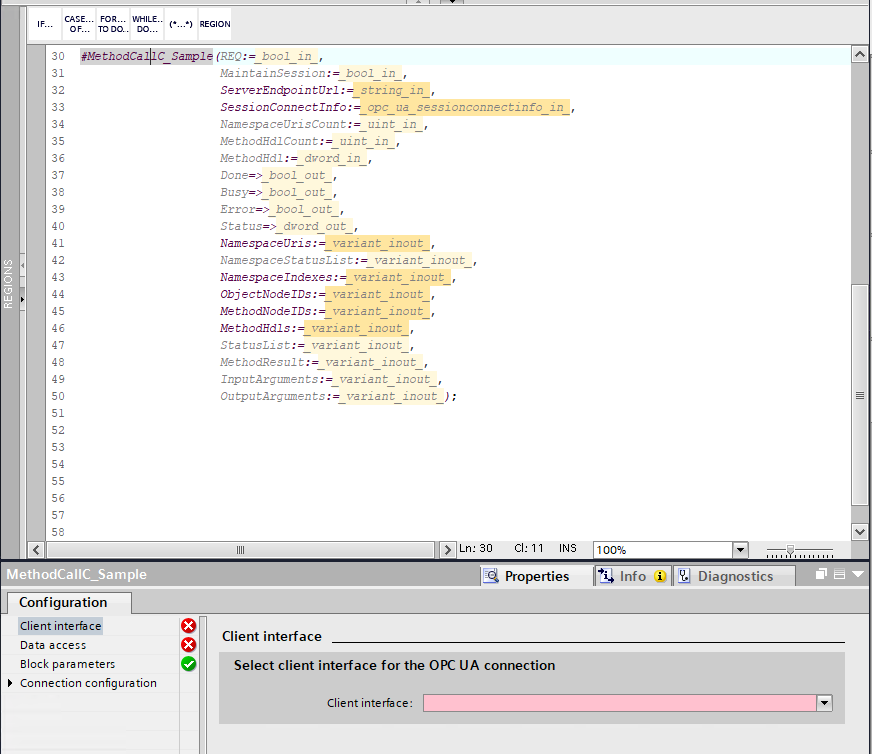
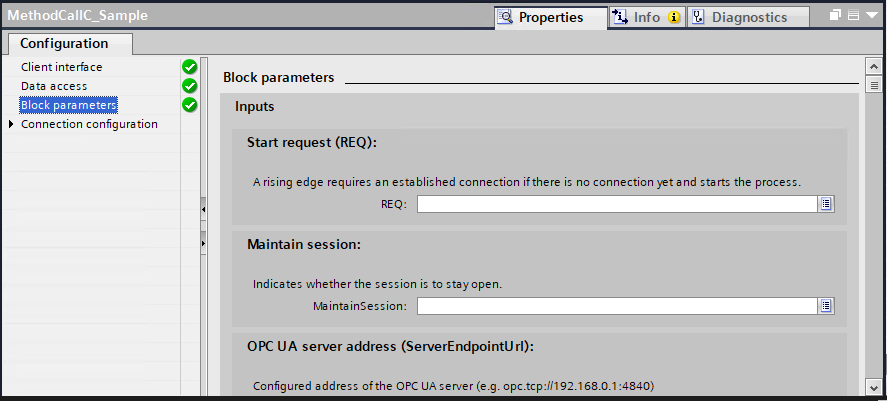
Die Parameter REQ und MaintainSession werden für den Methodenaufruf benötigt.
Die restlichen Output Parameter (Busy, Done, Error, Status) sind optional.
logo
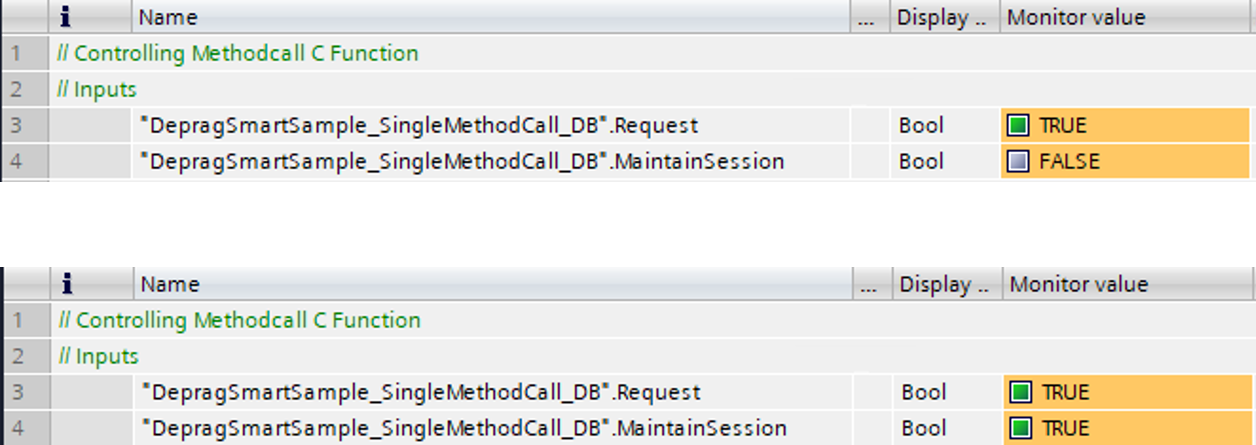
Ist der Eingang MaintainSession „FALSE“ und es wird eine positive Flanke am Eingang REQ erkannt, wird die Verbindung zum OPC UA Server aufgebaut, die Funktion ausgeführt und anschließend die Verbindung wieder getrennt.
Ist der Eingang MaintainSession „TRUE“, wird die Verbindung zum OPC UA Server aufgebaut und nach dem ausführen der Funktion aufrechterhalten. Die Funktion kann dann durch eine positive Flanke am Eingang REQ gestartet werden.
logo
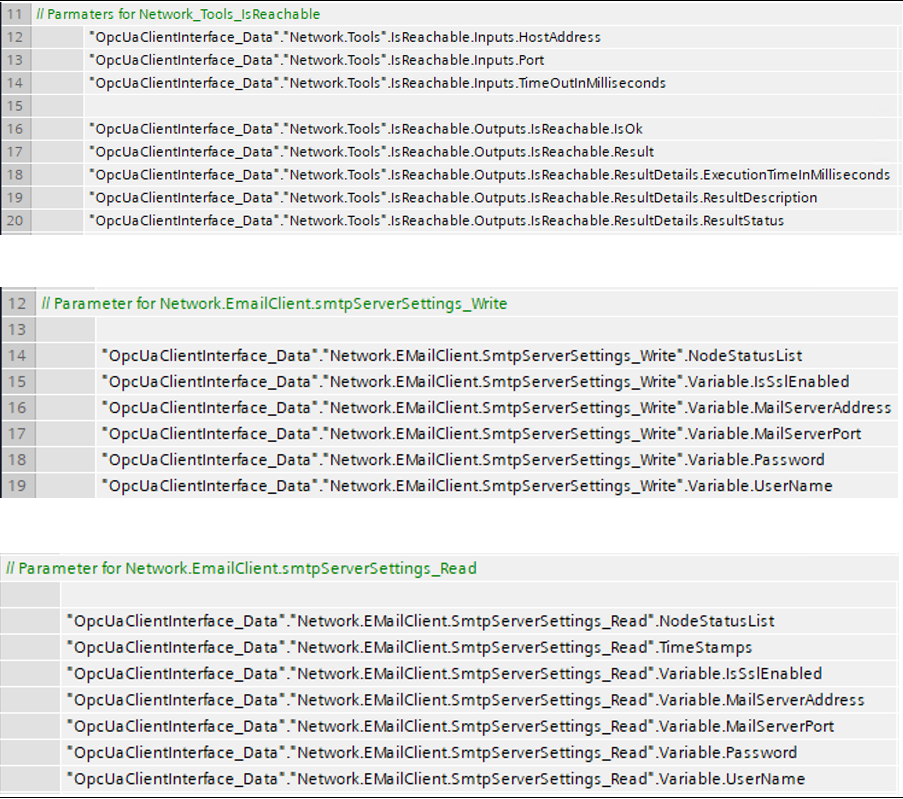
Die Variablen mit den Endwerten der jeweiligen Funktion sind in dem Datenbaustein „OpcUaClientInterface_Data“ unter der dazugehörigen Struktur zu finden.
logo

Listen und Methodenaufrufe mit Umschaltung

Die nachfolgenden Schritte beschreiben das Vorgehen der Listen und Methodenaufrufe mit Umschaltung

Die Funktionen OPC_UA_ReadList_C, OPC_UA_WriteList_C und OPC_UA_MethodCall_C können per Drag & Drop, oder durch einen Doppelklick auf den jeweiligen Funktionsbaustein dem bestehenden Programm hinzugefügt werden.
logo
Wählen Sie nun die Art sowie den Namen der Instanz für den verwendeten Funktionsbaustein aus.
logo
Klicken Sie auf den Instanznamen, um die Konfiguration zu öffnen.
logo
Wählen Sie das jeweilige OPC UA Client Interface aus.
logo
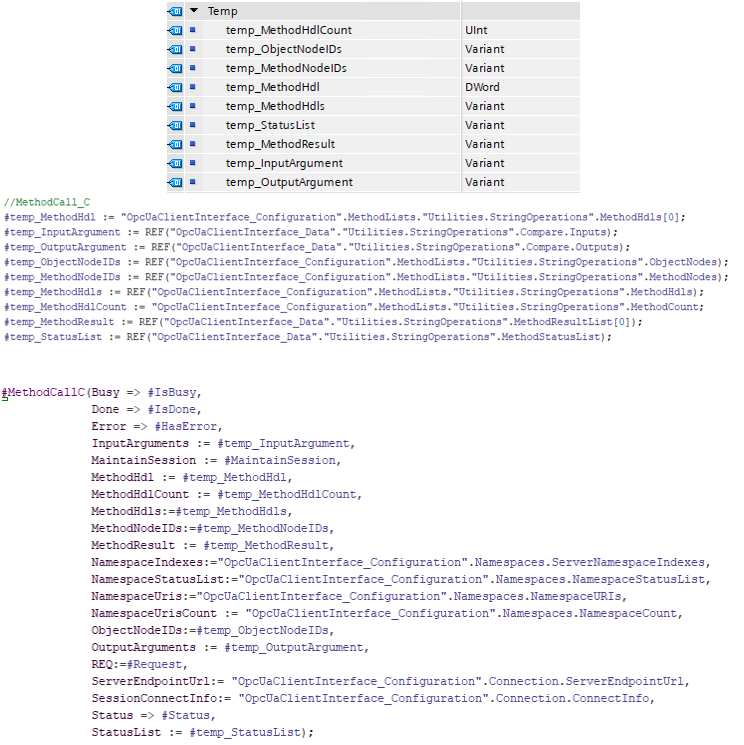
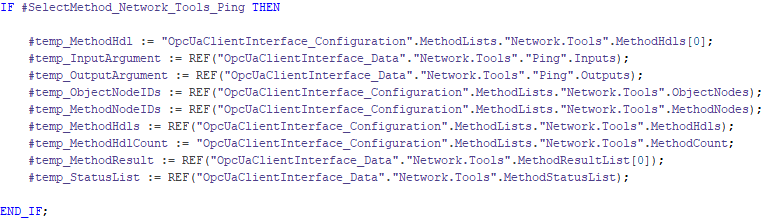
Legen Sie Variablen für die Funktionsparameter des MethodCall_C Bausteins an und verknüpfen Sie diese mit den jeweiligen Ein-/ Ausgängen des Funktionsbausteins.
Die Indexnummer der Variablen MethodHdl und MethodResult ist abhängig von der Position der Methode in der Methodenliste.
logo
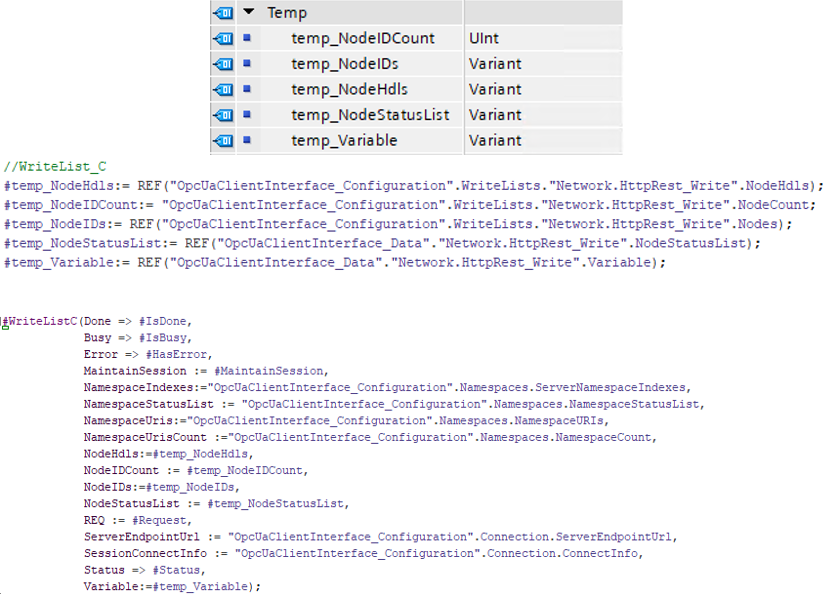
Legen Sie Variablen für die Funktionsparameter des WriteList_C Bausteins an und verknüpfen Sie diese mit den jeweiligen Ein-/ Ausgängen des Funktionsbausteins.
logo
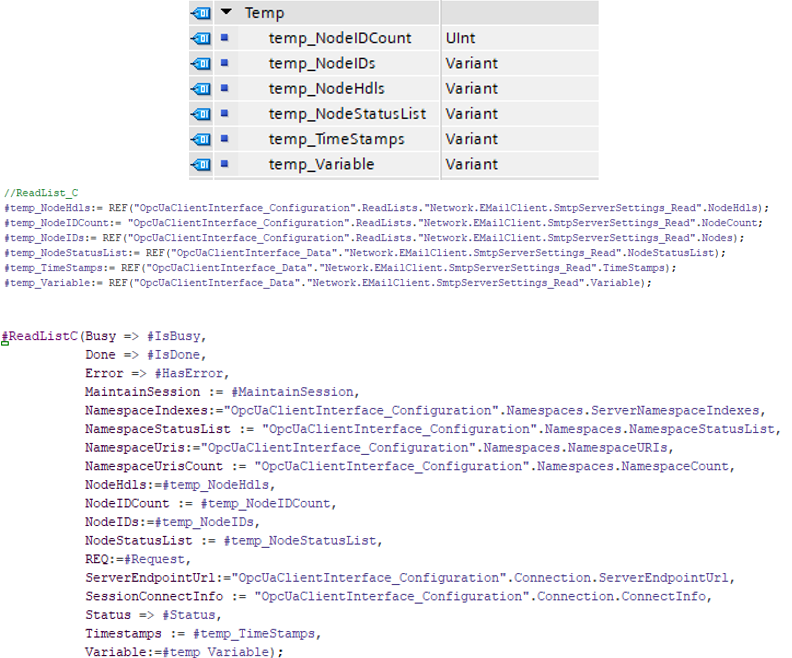
Legen Sie Variablen für die Funktionsparameter des ReadList_C Bausteins an und verknüpfen Sie diese mit den jeweiligen Ein-/ Ausgängen des Funktionsbausteins.
logo
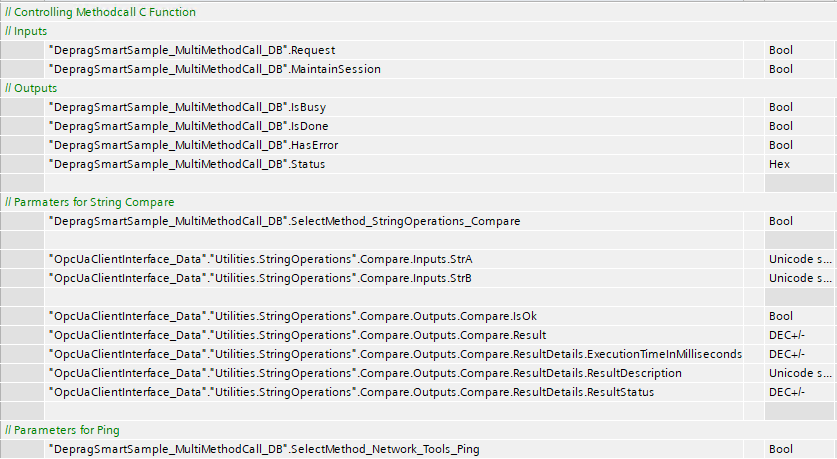
Die Umschaltung erfolgt in diesem Beispiel durch eine IF-Abfrage.
logo
Ist der Eingang MaintainSession „FALSE“ und es wird eine positive Flanke am Eingang REQ erkannt, wird die Verbindung zum OPC UA Server aufgebaut, die Funktion ausgeführt und anschließend die Verbindung wieder getrennt.
Ist der Eingang MaintainSession „TRUE“, wird die Verbindung zum OPC UA Server aufgebaut und nach dem ausführen der Funktion aufrechterhalten. Die Funktion kann dann durch eine positive Flanke am Eingang REQ gestartet werden.
ACHTUNG!
Die Variable MaintainSession muss vor jedem Umschaltvorgang zurückgesetzt werden, da es andernfalls zu Verbindungsproblemen führt.
logo
Die Variablen mit den Endwerten der jeweiligen Funktion sind in dem Datenbaustein „OpcUaClientInterface_Data“ unter der dazugehörigen Struktur zu finden.
logo

Verarbeitung von großen Strings (>255 Zeichen)

Damit der Datentyp WSTRING in der Programmierumgebung TIA Portal mehr als 255 Zeichen darstellen kann, muss diesem Datentyp eine fest definierte Größe zugewiesen werden. Um diese Zuweisung bei den verwendeten PLC-Datentypen abändern zu können, müssen Sie zuerst den zu ändernden PLC-Datentyp kopieren und anschließend umzubenennen.

logo

ACHTUNG! Der Name des kopierten PLC-Datentyps darf nicht mit dem Namen eines bereits existierenden PLC-Datentyps übereinstimmen, da bei dem Kompiliervorgang die Änderungen rückgängig gemacht werden.
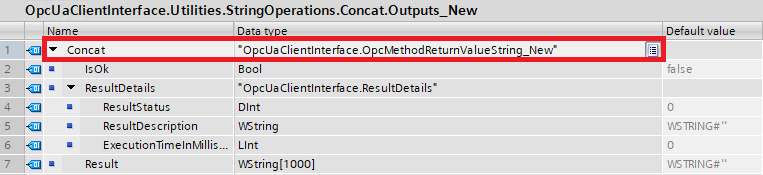
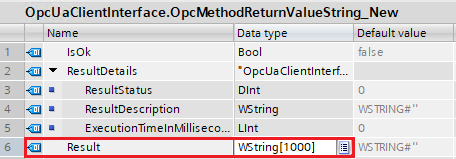
In dem neuerstellten PLC-Datentyp kann jetzt der Variable des Datentyps WSTRING eine fest definierte Größe zugewiesen werden.

logo

Legen Sie eine Variable (z.B. lokale Variable in einen Funktionsbaustein) mit dem neuerstellten Datentyp an und verknüpfen Sie diese mit dem jeweiligen Input / Output Arguments des Methodenaufrufs.
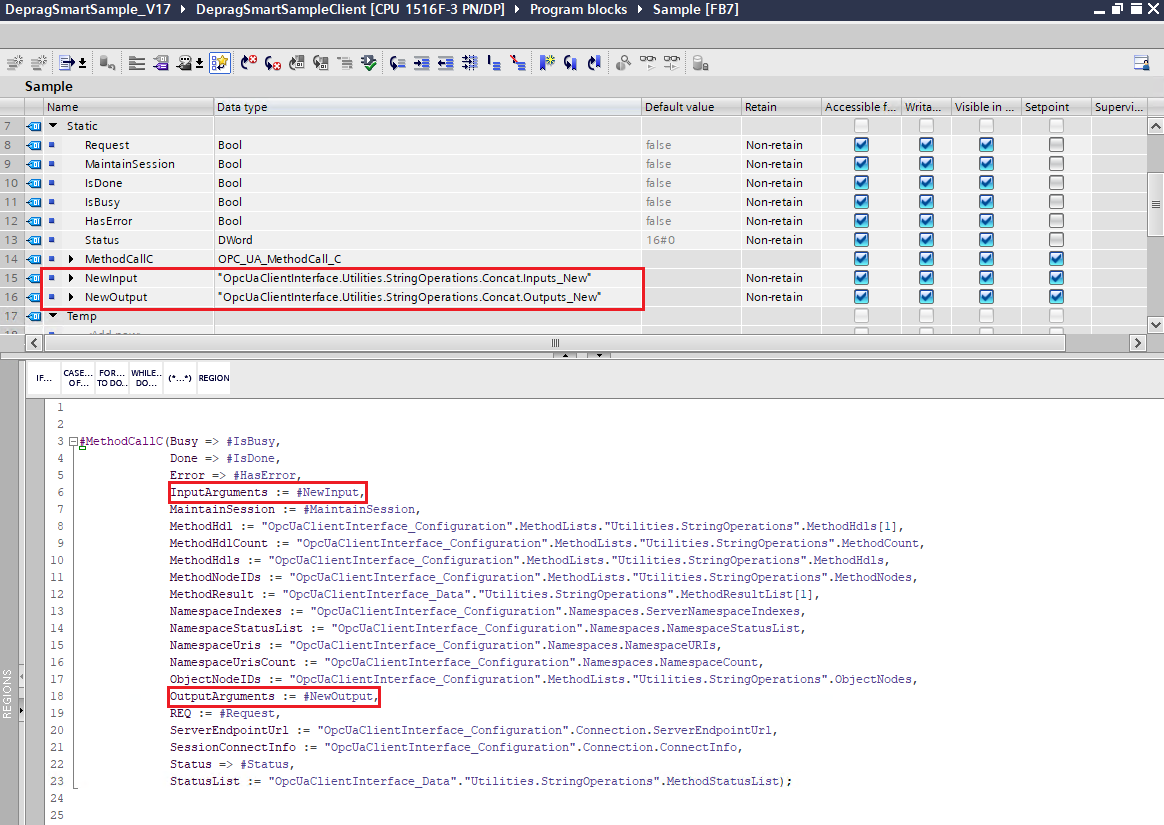
logo

ACHTUNG! In den Datenbausteinen OpcUaClienInterface_Data und OpcUaClientInterface_Configuration darf man keine neuen Variablen anlegen oder bestehende Variablen abändern, da bei einem Kompiliervorgang der Ausgangszustand dieser Datenbausteine wiederhergestellt wird.

Sonderfall!
Sollte der kopierte Datentyp mehrere PLC-Datentypen beinhalten müssen alle PLC-Datentypen, die für die Abänderung der Variable betroffen sind, ebenfalls kopiert und neu angelegt werden. Der Datentyp sollte dann, wie vorhergehend beschrieben, über die neu erstellten / bereits vorhanden PLC-Datentypen wieder reproduziert werden.
logo logo

Geräte

Im Bereich Geräte stehen Ihnen diverse Funktionalitäten zur Verwaltung von verschiedenen Geräten zur Verfügung, damit diese in Ihre SPS eingebunden werden können. Als Geräte stehen Ablaufsteuerungen der Firma DEPRAG zur Verfügung. Aber auch Geräte anderer Hersteller können über Open Protocol hinzugefügt werden. Alle Möglichkeiten werden in den nachfolgenden Abschnitten detailliert erläutert.

DEPRAG Geräte

Geräte DEPRAG Geräte

Bietet Funktionalität für die Verwaltung, Abfrage und Parametrierung von Geräten der Firma DEPRAG Schulz GmbH & Co.

Ablaufsteuerung

Geräte DEPRAG Geräte Ablaufsteuerung

Bietet Funktionalität für die Verwaltung, Abfrage und Parametrierung von Geräten der Firma DEPRAG Schulz GmbH & Co.

Methoden-Knoten

OPC UA Knoten
Beschreibung
TwinCAT
TIA

Fügt ein neues Gerät in die Liste ActiveDevices hinzu. Der Gerätetyp wird über die Variable "AstType" angegeben.

Fügt ein neues Gerät in die Liste "ActiveDevices" hinzu. Das Gerät ist noch nicht konfiguriert und muss über die Methode Configure im Anschluss konfiguriert werden.

Beendet die Verbindung zum Gerät und entfernt es aus der Liste "ActiveDevices".

Beendet die Verbindungen zu allen Geräten und entfernt diese aus der Liste "ActiveDevices".

ActiveDevices

Geräte DEPRAG Geräte Ablaufsteuerung ActiveDevices

Alle aktiven, registrierten DEPRAG Ablaufsteuerungen. Standardmäßig sind bereits 10 unparametrierte Geräteknoten angelegt, die über die "Configure"-Methode konfiguriert werden können.

Ein Client

Geräte DEPRAG Geräte Ablaufsteuerung ActiveDevices Ein Client

Spezifiziert die Struktur und den Aufbau einer DEPRAG Ablaufsteuerung inklusive aller Methoden und Parameter.

Methoden-Knoten

OPC UA Knoten
Beschreibung
TwinCAT
TIA

Der Befehl konfiguriert ein am DEPRAG Smart OPC UA Server registriertes Gerät. Dieses kann im Anschluss parametriert und abgerufen werden.

Variablen-Knoten / Eigenschaften

OPC UA Knoten
Beschreibung
Schreiben
Lesen
TwinCAT
TIA
Id

Eindeutiger Listen Index, um in der Liste der ActiveDevices das Gerät abzurufen.

AST Geräte Typ: AST12

IP Adresse der DEPRAG Ablaufsteuerung.

Prozessdaten

Geräte DEPRAG Geräte Ablaufsteuerung ActiveDevices Ein Client Prozessdaten

Abfrage der Endwerte der letzten Verschraubung. Die Endwerte beinhalten alle relevanten Informationen zu ausgeführten Schraubstufen und Befehlen. Die Einheit der Werte wird im Objekt mitgegeben.

Schraubablauf

Geräte DEPRAG Geräte Ablaufsteuerung ActiveDevices Ein Client Schraubablauf

In diesem Bereich können die Schraubabläufe der Ablaufsteuerung eingesehen, bearbeitet und gelöscht werden.

Methoden-Knoten

OPC UA Knoten
Beschreibung
TwinCAT
TIA

Erstellt oder verändert ein vorhandenes Schraubprogramm.

Löscht alle vorhandenen Schraubprogramme auf der verbundenen Ablaufsteuerung.

Löscht das angegebene Schraubprogramm auf der verbundenen Ablaufsteuerung.

Ruft das angegebene Schraubprogramm von der verbundenen Ablaufsteuerung ab.

Einstellungen

Geräte DEPRAG Geräte Ablaufsteuerung ActiveDevices Ein Client Einstellungen

In diesem Bereich können die Einstellungen der Ablaufsteuerung abgerufen und bearbeitet werden.

Datum/Uhrzeit

Geräte DEPRAG Geräte Ablaufsteuerung ActiveDevices Ein Client Einstellungen Datum/Uhrzeit

In diesem Bereich können die Einstellungen zur Systemzeit der Ablaufsteuerung abgerufen oder gesetzt werden. Die Systemzeit des Gerätes dient zur Dokumentation der Schraubergebnisse und damit der Endwerte.

Methoden-Knoten

OPC UA Knoten
Beschreibung
TwinCAT
TIA

Ruft die aktuelle Systemzeit der Ablaufsteuerung ab.

Setzt die Systemzeit auf der Ablaufsteuerung.

Systeminfo

Geräte DEPRAG Geräte Ablaufsteuerung ActiveDevices Ein Client Systeminfo

In diesem Bereich können Systemdaten der Ablaufsteuerung abgerufen werden. Systemdaten können dabei generelle Informationen, sowie gesetzte Parameter der Ablaufsteuerung sein. Die Systemdaten werden mittels eines Key-Identifiers von der Ablaufsteuerung abgerufen.

Steuerungsdaten

Geräte DEPRAG Geräte Ablaufsteuerung ActiveDevices Ein Client Systeminfo Steuerungsdaten

In diesem Bereich können Systemdaten der Ablaufsteuerung abgerufen werden. Systemdaten können dabei generelle Informationen, sowie gesetzte Parameter der Ablaufsteuerung sein. Die Systemdaten werden mittels eines Key-Identifiers von der Ablaufsteuerung abgerufen.

Methoden-Knoten

OPC UA Knoten
Beschreibung
TwinCAT
TIA

Ruft einen Eintrag ab.

Ruft die Anzahl an Elementen in den Systemdaten ab.

Fordert einen indexabhänigen Schlüssel aus den Systemdaten an.

Fordert alle Schlüssel der Systemdaten an.

Werkzeugdaten

Geräte DEPRAG Geräte Ablaufsteuerung ActiveDevices Ein Client Systeminfo Werkzeugdaten

In diesem Bereich können Werkzeugdaten des Werkzeuges eingesehen werden. Die Werkzeugdaten beinhalten Informationen über das angeschlossene Schraubwerkzeug. Die Werkzeugdaten werden mittels eines Key-Identifiers von der Ablaufsteuerung abgerufen.

Methoden-Knoten

OPC UA Knoten
Beschreibung
TwinCAT
TIA

Fordert einen spezifischen Wert der Werkzeugdaten an.

Fordert die Anzahl der Elemente von Werkzeugdaten an.

Fordert einen indexabhänigen Schlüssel der Werkzeugdaten an.

Fordert alle Schlüssel der Werkzeugdaten an.

Herstellerübergreifende Geräte

Geräte Herstellerübergreifende Geräte

Bietet Funktionalitäten für die Verwaltung, Abfrage und Parametrierung von Geräten unterschiedlicher Hersteller.

Open Protocol Geräte

Geräte Herstellerübergreifende Geräte Open Protocol Geräte

Bietet Funktionalitäten für die Verwaltung, Abfrage und Parametrierung von Geräten, die die Open Protocol Schnittstelle unterstützen.

Methoden-Knoten

OPC UA Knoten
Beschreibung
TwinCAT
TIA

Fügt ein neues Gerät zur Liste "OpenProtocolDevices" hinzu.

Entfernt ein Gerät aus der Liste "OpenProtocolDevices".

Entfernt alle Geräte aus der Liste "OpenProtocolDevices".

OpenProtocolDevices

Geräte Herstellerübergreifende Geräte Open Protocol Geräte OpenProtocolDevices

Alle registrierten Open Protocol Geräte. Standardmäßig sind bereits 10 unparametrierte Geräteknoten angelegt, die über die "Connect"-Methode konfiguriert und verbunden werden können.

Ein Gerät

Geräte Herstellerübergreifende Geräte Open Protocol Geräte OpenProtocolDevices Ein Gerät

Stellt verschiedene Methoden, Events und Eigenschaften zur Verfügung, um mit einem Open Protocol Gerät zu interagieren.

Methoden-Knoten

OPC UA Knoten
Beschreibung
TwinCAT
TIA

Stellt die Verbindung zu einem Open Protocol Gerät her. DEPRAG Smart agiert dabei als Open Protocol Client, der die Verbindung zu einem Open Protocol Server herstellt.

Trennt die Verbindung zu einem Open Protocol Gerät.

Diese Nachricht kann verwendet werden, um die Startfreigabe zurückzunehmen. Es können keine Schraubläufe gestartet werden, das Gerät ist nicht schraubbereit.

Diese Nachricht kann verwendet werden, um die Startfreigabe zu setzen. Es können Schraubläufe gestartet werden, die Steuerung ist schraubbereit.

Wählt ein Schraubprogramm aus.

Wird benutzt, um eine Anmerkung (entspricht VIN oder VehicleId) an das Gerät zu übertragen.

Abfrage der Endwerte der letzten Verschraubung.

Event-Knoten

OPC UA Knoten
Beschreibung
TwinCAT
TIA

Das Event wird ausgelöst, sobald ein Schraubergebnis vom verbundenen Open Protocol Server empfangen wird.

Das Event wird ausgelöst, sobald keine Rückantwort vom verbundenen Open Protocol Server auf eine gesendete Keep-Alive-Meldung empfangen wird.

Variablen-Knoten / Eigenschaften

OPC UA Knoten
Beschreibung
Schreiben
Lesen
TwinCAT
TIA
Id

Eindeutiger Listen Index, um in der Liste der OpenProtocolDevices das Gerät abzurufen.

Lokal

Bietet Funktionen für den Zugriff auf lokale Ressourcen.

Laufwerks-Management

Lokal Laufwerks-Management

Funktionen für den Zugriff auf Laufwerke.

Methoden-Knoten

OPC UA Knoten
Beschreibung
TwinCAT
TIA

The command returns a list of all logical drives with their properties.

The command returns the number of available drives.

The command returns the properties for the drive with the specified index.

File and directory access

Local File and directory access

Functions for accessing files and folders.

Folder

Local File and directory access Folder

Functions to access folders on the file system.

Method node

OPC UA Node
Description
TwinCAT
TIA

The command creates the specified directory.

The command deletes the specified directory.

The command outputs an array with all directories in the specified path. Each array element contains the properties of a directory.

The command returns the number of directories contained in the specified path.

The command returns the properties of the directory with the specified index that is located in the specified directory.

The command outputs an array with all files in the specified path. Each array element contains the properties of a file.

The command returns the number of files contained in the specified path.

The command returns the properties of the file with the specified index, located in the specified directory.

The command reads the properties of the directory.

The command gets the size of the specified directory in bytes.

Excel

Local File and directory access Excel

Provides functions for editing Excel files.

Method node

OPC UA Node
Description
TwinCAT
TIA

The command creates a new Excel worksheet in a specified path. If the specified Excel worksheet already exists, no new Excel worksheet will be created.

The command deletes the Excel worksheet in the specified path.

The command writes a new value to a cell of the specified Excel worksheet in a specified path.

The command reads a value from a cell of the specified Excel worksheet in a specified path.

The command reads the values of cells of a row with specified start and end column index of the specified Excel worksheet in a specified path.

The command reads out the values from the first filled cell to the last filled cell of a row in the specified Excel worksheet in a specified path. If there are empty entries between the first and the last filled cell, they are included in the output.

The command reads the values of all cells in a row of the specified Excel worksheet in a specified path.

The command writes new values to the cells of a row of the specified Excel worksheet in a specified path.

The command deletes a row from the specified Excel worksheet in the specified path.

File

Local File and directory access File

Functions to access the file system.

Method node

OPC UA Node
Description
TwinCAT
TIA

The command copies an existing file to a specified path. If the specified file already exists, an error is output.

The command copies an existing file to a specified path. If the specified file already exists, it can be overwritten.

The command deletes the file in the specified path.

The command returns the file properties of the specified file.

The command reads the contents of the file into a byte array.

The command writes a byte array to a file.

The command reads the contents of a file into a string.

The command writes a string to the specified file.

JSON reader

Local File and directory access JSON reader

Provides the function of a JSON reader.

Method node

OPC UA Node
Description
TwinCAT
TIA

The command opens a JSON file for further processing. The reader can be retrieved from the ActiveJsonDocuments list using the returned index.

The command inserts a JSON reader in the ActiveJsonDocuments list. The reader can be retrieved from the ActiveJsonDocuments list using the returned index.

The command closes the JSON document and releases the index in the ActiveJsonDocuments list.

ActiveJsonDocuments

Local File and directory access JSON reader ActiveJsonDocuments

List of active JSON documents

A JSON document

Local File and directory access JSON reader ActiveJsonDocuments A JSON document

Functions that can be applied to a JSON document.

Method node

OPC UA Node
Description
TwinCAT
TIA

The command sets the path of the JSON document.

This command can be used to check whether the specified element is included in the JSON document.

The command returns the value of the specified element. This command is used when a scalar value is expected.

The command checks whether the value of the specified element contains an array.

The command returns the value of the specified key. This command is used when an array is expected as a value.

Variable nodes / properties

OPC UA Node
Description
Write
Read
TwinCAT
TIA
Id

Unique index

Path of the JSON document.

XML reader

Local File and directory access XML reader

Provides function for accessing XML files.

Method node

OPC UA Node
Description
TwinCAT
TIA

The command opens an XML file for further processing. The reader can be retrieved from the "ActiveXMLDocuments" list via the returned index.

The command registers an unconfigured XML reader. The reader can be retrieved from the "ActiveXMLDocuments" list via the returned index.

The command closes the XML document and releases the index in the ActiveXMLDocuments list.

ActiveXMLDocuments

Local File and directory access XML reader ActiveXMLDocuments

List of active XML documents.

A reader

Local File and directory access XML reader ActiveXMLDocuments A reader

A concrete XML reader.

Method node

OPC UA Node
Description
TwinCAT
TIA

The command sets the path of the XML document.

The command returns the value of the specified XML element.

This command can be used to check whether the specified XML element is contained in the XML document.

Variable nodes / properties

OPC UA Node
Description
Write
Read
TwinCAT
TIA
Id

Unique index.

Path of the XML document.

Mouse functions

Local Mouse functions

The Mouse functions section provides functionalities for evaluating mouse events, such as pressing a mouse button.

Method node

OPC UA Node
Description
TwinCAT
TIA

Returns the position of the mouse when a mouse button was last pressed. The prerequisite for this is that the detection of the position was previously activated via the "StartDetectingMouseClick" function.

Starts monitoring the position of the mouse when a mouse button is pressed.

Stops monitoring the position of the mouse when a mouse button is pressed.

Event node

OPC UA Node
Description
TwinCAT
TIA

The event is triggered as soon as a mouse button is pressed. The prerequisite for this is that the detection of the position was previously activated via the "StartDetectingMouseClick" function.

Print

Local Print

In the Print area, functionalities are available to communicate with the connected standard printer and to print files, for example.

Method node

OPC UA Node
Description
TwinCAT
TIA

Allows to print any files on the default printer set on the system.

Network

In the network area, various network functionalities are available to integrate your PLC into a modern Industry 4.0 environment. These include functionalities for sending emails, MQTT functions, REST, as well as TCP/IP and general network tools. These are explained in detail in the following sections.

E-Mail

Network E-Mail

Provides functionalities for sending e-mail messages to multiple recipients. Optionally, attachments can be transmitted. Before using the functionality, the SMTP server must be set in the SmtpServerSettings settings.

Method node

OPC UA Node
Description
TwinCAT
TIA

This command sends an e-mail message without attachments to all e-mail addresses stored in the MailAddressTo field. Before using the functionality, the SMTP server must be set in the SmtpServerSettings settings.

This command sends an e-mail message with attachments to all e-mail addresses stored in the MailAddressTo field. File attachments are passed in the AttachmentFilePaths field. Before using the functionality, the SMTP server must be set in the SmtpServerSettings settings.

SmtpServerSettings

Network E-Mail SmtpServerSettings

Enables configuration of a Simple Mail Transfer Protocol (SMTP) server for sending e-mail messages.

Variable nodes / properties

OPC UA Node
Description
Write
Read
TwinCAT
TIA

Specifies whether the connection to the SMTP server should be encrypted using SSL protocol.

Address of the SMTP server.

Port of the SMTP server.

The user name with which the application authenticates itself to the SMTP server.

Password with which the application authenticates itself to the SMTP server.

REST Client

Network REST Client

Allows the submission of HTTP requests, queries or changes (GET, POST, PUT). A REST client (Representational State Transfer) library is provided for communication with a REST API.

Method node

OPC UA Node
Description
TwinCAT
TIA

The command registers an unconfigured REST client. The client must be configured using the Configure command before use.

Creates a new, fully parameterized REST client. The REST client can be retrieved from the "ActiveClients" list via the returned index.

The command terminates the connection of a concrete REST client and removes it from the list of active clients.

The command terminates all active REST connections and removes all REST clients from the list of active clients.

ActiveClients

Network REST Client ActiveClients

List of active clients

One client

Network REST Client ActiveClients One client

Properties of an ActiveClient.

Method node

OPC UA Node
Description
TwinCAT
TIA

Configures a REST client. This command must be executed if the client has been added via the AddUnparameterizedClient method or one of the 10 clients created by default is used.

The command adds a new header element in the request.

The command removes the specified header.

Sets the proxy server. The proxy server is used for all requests to the API.

Removes the proxy server.

Get

Sends a GET request to a URL.

Sends a DELETE request to a URL.

Sends a POST command to a URL.

Sends a PATCH command to a URL.

Put

Sends a PUT command to a URL.

Downloads a file from the specified endpoint and provides a byte array as response.

Uploads a file to the specified endpoint.

Variable nodes / properties

OPC UA Node
Description
Write
Read
TwinCAT
TIA
Id

Unique identification of the REST client.

Sets or retrieves the content type HTTP header.

Maximum time in milliseconds for establishing a connection to the REST API. If a connection cannot be established within the time interval, an error is issued.

Predefined headers that are sent each time the REST API is called.

The base address of the URI for the REST API calls.

Maximum number of bytes to cache for calls to the REST API.

MQTT Client

Network MQTT Client

High-performance MQTT (Message Queing Telemetry Transport) client library for communication with MQTT brokers. The implementation allows fast transmission of MQTT messages without time-critical overhead.

Method node

OPC UA Node
Description
TwinCAT
TIA

Creates a new, fully parameterized MQTT client. The MQTT client can be retrieved from the ActiveClients list via a zero-based index.

The command registers an unconfigured MQTT client. The device must be configured via the Configure command before use.

The command terminates the connection of a concrete MQTT client and removes it from the list of active clients.

The command terminates all active MQTT connections and removes all MQTT clients from the list of active clients.

ActiveClients

Network MQTT Client ActiveClients

List of active MQTT clients.

One client

Network MQTT Client ActiveClients One client

Properties of an ActiveClient.

Method node

OPC UA Node
Description
TwinCAT
TIA

Configures an MQTT client. This command must be executed if the client has been added via the AddUnparameterizedClient method.

The command sends a message with associated topic to the MQTT broker.

The command sends a message with associated topic to the MQTT broker.

Parameterizes the MQTT client with all parameters and establishes a connection to the specified MQTT broker.

Parameterizes the MQTT client and establishes a connection to the specified MQTT broker.

Lightweight function to connect to the specified MQTT broker.

Parameterizes the MQTT client and establishes a connection to the specified MQTT broker.

Disconnects the MQTT client from the MQTT broker.

Subscribes to an MQTT topic with default settings from the MQTT broker.

Subscribes to an MQTT topic with QoS from the MQTT broker.

Subscribes an MQTT topic from the MQTT broker. The method allows to set all properties of a MQTT subscription.

Unsubscribes a MQTT Topic from the MQTT Broker.

Event node

OPC UA Node
Description
TwinCAT
TIA

The event is triggered as soon as the MQTT connection has been successfully established.

The event is triggered as soon as the MQTT connection is interrupted.

The event is triggered as soon as the connection to the MQTT broker has failed.

The event is triggered as soon as an MQTT message is received.

Variable nodes / properties

OPC UA Node
Description
Write
Read
TwinCAT
TIA
Id

Unique identification of the MQTT client in the list of active clients.

Indicates whether the MQTT client is connected to the MQTT broker.

Indicates whether the MQTT client is started.

Number of messages not yet transmitted in the local buffer memory. The messages still have to be transferred to the MQTT broker.

TCP/IP client

Network TCP/IP client

Provides the ability to connect to a TCP/IP server and exchange messages.

Method node

OPC UA Node
Description
TwinCAT
TIA

Creates a new, fully parameterized TCP/IP client. The client can be retrieved from the "ActiveClients" list via the returned index.

The command registers an unconfigured TCP/IP client. The client must be configured via the Configure command before use.

The command terminates the connection of a concrete TCP/IP client and removes it from the ActiveClients list.

The command terminates all active TCP/IP connections and removes all clients from the ActiveClients list.

ActiveClients

Network TCP/IP client ActiveClients

List of created TCP/IP clients.

One client

Network TCP/IP client ActiveClients One client

A concrete TCP/IP client.

Method node

OPC UA Node
Description
TwinCAT
TIA

Configures a TCP/IP client. This command is to be executed if the client has been added via the AddUnparameterizedClient method or one of the 10 clients created by default is used.

The command sends a string as a TCP/IP message to the server.

The command sends a byte array as a TCP/IP message to the server.

The command receives all characters up to the first occurrence of the specified string.

The command receives a specified number of characters.

The command establishes a connection between TCP/IP client and server.

The command terminates the connection between TCP/IP client and server.

Variable nodes / properties

OPC UA Node
Description
Write
Read
TwinCAT
TIA
Id

Unique index with which the TCP/IP client can be retrieved from the "ActiveClients" list.

IP or DNS address of the server.

Port of the server.

Indicates whether the TCP/IP client is connected to the server.

Determines whether the connection should be restored automatically after a connection loss.

Maximum time in milliseconds for sending a message. If the message cannot be sent completely within the time interval, an error is output.

Maximum time in milliseconds that the client waits for the reception of a message. If the message cannot be received completely within the time interval, an error is issued.

The encoding of the message content: Ascii, BigEndian, Unicode, Default, Latin1, Unicode, Utf32, Utf7, Utf8

Network tools

Network Network tools

The Network Tools section provides you with typical network commands that you can use to check the accessibility of network participants.

Method node

OPC UA Node
Description
TwinCAT
TIA

This command sends an ICMP (Internet Control Message Protocol) request to the configured host address. A corresponding response is expected from the host address within the configured time. This function is useful for testing network availability, PLC reachability, network status diagnostics, etc.

This command can be used to check the reachability of a specified port at a configured IP address.

Software version and update availability

This function provides the possibility to search for updates for DEPRAG Smart.

Method node

OPC UA Node
Description
TwinCAT
TIA

Checks if a new software update is available.

Variable nodes / properties

OPC UA Node
Description
Write
Read
TwinCAT
TIA

A string indicating the publisher of the software.

Contains the currently used software version.

Indicates whether a software update is available.

Indicates whether the update server is reachable.

Indicates when a check for software updates was last carried out.

Tools

This area provides small, useful functionalities, such as functionalities for handling byte arrays and strings.

ByteArray functions

Tools ByteArray functions

This section provides functionalities for handling byte arrays and conversion methods for them.

Method node

OPC UA Node
Description
TwinCAT
TIA

Converts the specified base-64 encoded string into a corresponding byte array.

Converts a byte array to the corresponding base-64 encoded string representation.

Converts the specified hexadecimal encoded string into a corresponding byte array.

Converts a byte array to the corresponding hexadecimal string representation.

Converts the specified string to a corresponding byte array.

Converts a byte array to the appropriate string representation using the specified character encoding.

String functions

Tools String functions

This area provides functionalities for handling strings (character strings).

Method node

OPC UA Node
Description
TwinCAT
TIA

Compares two specified strings and returns an integer indicating their relative lexicographic order.

Concatenates the first specified string with the second specified string.

Checks if a text occurs in another text and returns the result.

Checks if a text ends with another text.

Checks if two texts are the same.

Inserts text at a specified index position into another text and returns the result.

Replaces all occurrences of a specified string in a text with another one.

Divides a text at one character (separator) into different parts.

Checks if a text starts with a certain value.

Returns the part of the specified text starting from a passed index position.

Returns a part of the specified text. The part starts from the Startindex parameter and ends at Startindex+Length.

Removes all white space characters at the beginning and end of the specified text.

Converts all uppercase letters of the specified text to lowercase.

Converts all lowercase letters of the specified text to uppercase.

Searches for a text in another text and returns the zero-based position of the first occurrence.